Families, details, legends and project standards — one searchable, AI-tagged library your whole team places from, right inside Revit. Point it at your local folders for instant browsing, add the cloud to share the latest with everyone. Private to your firm.
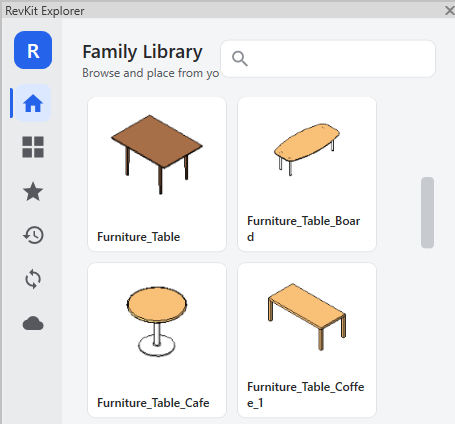
Find it in the RevKit panel, click, and it drops straight into your model — no file explorer, no hunting.
Inserting a family from the RevKit panel, straight into a Revit model.
Architects keep their furniture and fixtures in RevKit and drop them straight into the model — sofas, tables, casework, all a click away. No hunting through folders.
Placing furniture from the RevKit library, inside Revit.
Structural engineers keep their reinforcement families in RevKit and drop them straight into the model. Here's slab reinforcement, start to finish.
Placing slab rebar from the RevKit library, inside Revit.
Build your firm's library once: upload families to the cloud, organize and edit them in the batch editor, and point RevKit at your existing local folders so everything shows up in one panel.
Uploading and managing cloud content, and adding local folders in RevKit.
From AI-tagged uploads and reusable details to 3D previews, version history and batch editing — built for the way BIM teams actually work, in Revit, on deadline.
Point RevKit at your local and network folders and start browsing instantly — no migration, no upload wait. A dockable panel in Revit, families placed in two clicks.
Upload a family once and everyone in your firm has it instantly. Your content stays private to your company.
Upload a revision and RevKit keeps the history. The team always gets the current version — and you can look back anytime.
Collections, tags, categories and descriptions travel with every family, so the right one is seconds away.
As each family, detail and legend lands, AI reads it and adds clean, consistent tags — so the whole library is findable from day one, with no manual tagging.
Your firm's drafting details and legends, browsed as thumbnails and dropped straight into the active view. Search them across every project by name or tag.
Upload a reference project and RevKit catalogues its view templates, sheets, title blocks and standards — and lets you harvest its families straight into the shared library.
Every download is counted, so you can tell which content earns its place — and which is dead weight.
Admins, Members and Viewers. Decide who can upload, who can organize, and who can only browse.
Spin an interactive 3D preview, and see every type, parameter and geometry stat — auto-extracted on upload and fully searchable. Find by what a family is, not just its name.
Spot oversized families, heavy geometry and Revit warnings at a glance — and see exactly what changed between versions, so you know before you place.
Manage the whole library like a spreadsheet — search, sort, bulk-edit and multi-delete. Add your own columns (manufacturer, cost, fire rating) and make them searchable.
Save any filter as a Smart List — “all fire-rated doors, Revit 2026”. New families that match join automatically, in the browser and inside Revit. No maintenance.
No servers to set up. No drives to map.
One installer covers Revit 2023 through 2027. No admin rights needed.
Create your company library and invite your team by email.
Open the RevKit panel in Revit and start placing families straight into your model.
One installer, every supported version — pick what you have.
Start a free trial of the Revit add-in, or create your company library and invite your team — it takes a couple of minutes.
 RevKit